Azure AI Foundry is now Microsoft Foundry: what FDEs need to know when deploying models and agents on a client's Azure
At least one FDE job ad still uses the old name. The hard parts are the ones few people mention: where data is processed, how many RU/s Cosmos DB gets and who creates the private endpoints.
In brief
- Azure AI Foundry has been renamed Microsoft Foundry, and the Agent API has moved from the Assistants API to the Responses API (Agents v2).
- The first job at a client is choosing the deployment type, because it determines where data is processed.
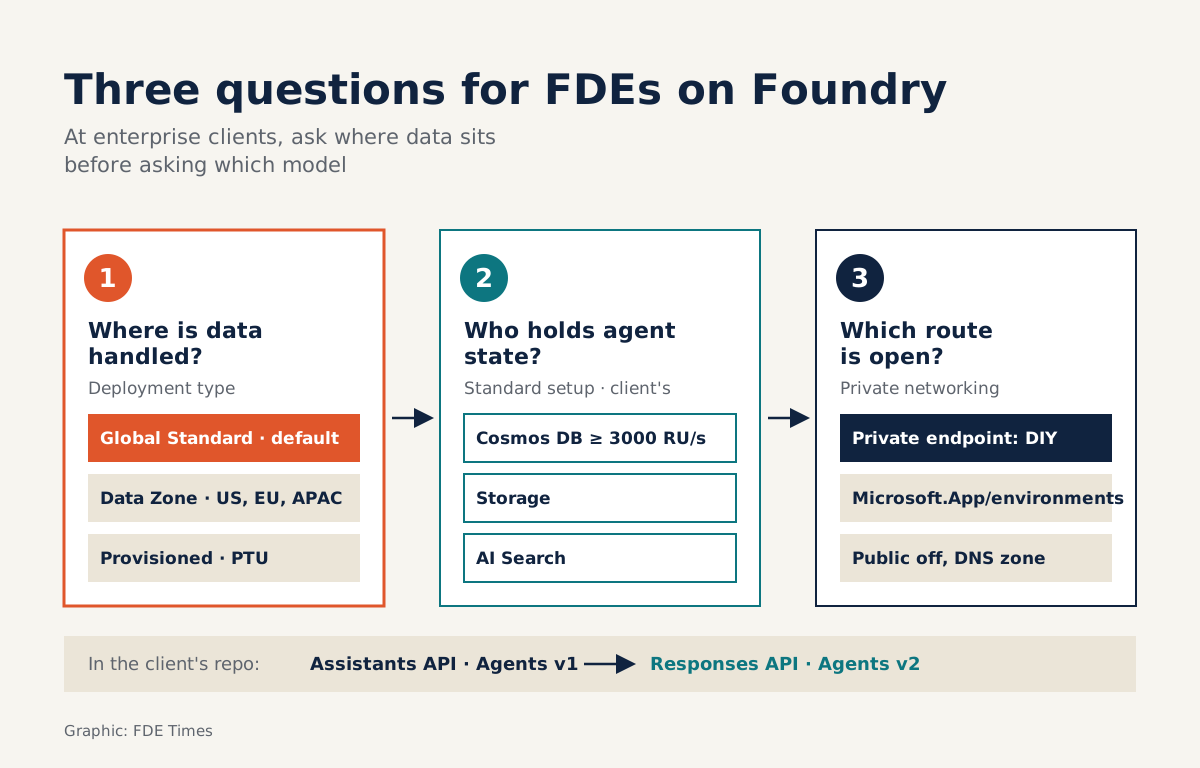
- Standard setup runs on the client's own Cosmos DB, Storage and AI Search. Cosmos DB needs at least 3000 RU/s, and you have to create the private endpoints yourself.
An architect-level “Azure Forward Deployment Engineer” job ad, posted on Dice for Fusion Global Solutions, asks for hands-on experience building AI agents on Azure AI Foundry. Open Microsoft’s documentation today and you will not find that name: the product is now Microsoft Foundry, with its main portal at ai.azure.com.
A naming mismatch sounds trivial, but it captures the FDE job well. At enterprise clients you will run into code written against old APIs, internal documents that use old names and infrastructure decisions whose rationale nobody remembers. Getting things done means knowing where the platform has changed and what tends to break in real deployments.
What does Foundry actually bring together?
Microsoft describes Foundry as the place where agents, models and tools sit under one management grouping. Tracing, monitoring, evaluation, RBAC, networking and policy all live in the same Azure resource provider. The group of services formerly called Azure AI Services is now known as Foundry Tools.
For FDEs, the most important change is the Agent API: the Assistants API (Agents v1) has given way to the Responses API (Agents v2). If the client’s repo still calls Assistants, put the migration into the plan from day one rather than discovering it in the final week.
The first question: where is the data processed?
When you deploy a model, the deployment type determines three things: where data is processed (globally, within a data zone or within a single Azure geography), how you are billed and what performance you get. Microsoft recommends that most workloads start with Global Standard, because new models always launch there first, it is the cheapest and it covers the most regions.
Suppose you are working for a European insurer whose compliance team requires that prompts never leave the EU. Global Standard is no longer the default choice. Data Zone EU processes prompts and responses only within that data zone. If the client needs steady throughput for peak hours, also look at Provisioned, which uses PTUs.
| Deployment type | When to choose it |
|---|---|
| Global Standard | The default, when the client has no constraint on where data is processed |
| Data Zone (US, EU, APAC) | When compliance requires processing to stay within a data zone |
| Provisioned (PTU) | When you need steady, reserved throughput |
Ask it in the first discovery session, before writing a line of code. Changing deployment type once a demo is running costs far more effort than choosing correctly at the start.
Prompt agent or hosted agent?
Agent Service offers three kinds of agent. Prompt agents are declarative and Foundry runs them for you. Voice-based prompt agents are the voice variant. Hosted agents give you the most control: you bring your own code and framework, package it as a container or zip file, and Foundry handles the endpoint, scaling and identity.
The clearest difference between the two lies in networking. According to Microsoft’s documentation, private networking is available for prompt agents, while hosted agents support BYO VNet: each session runs in a VM-level isolated sandbox connected to the client’s VNet.
Picture a bank that already has an agent written in LangChain and needs to call a credit-scoring API exposed only on its internal network.
Rewriting it as a prompt agent means throwing away working code, whereas a hosted agent lets you package the existing code as a container. But the deciding factor is BYO VNet: only if the session connects to the bank’s VNet can the agent reach that API.
A common failure is demoing a hosted agent in an open environment where everything runs smoothly, then moving it into the client’s VNet and finding the agent cannot call internal systems because nobody talked to the network team.
So for clients that already have agents built with Semantic Kernel or LangChain, a hosted agent is often the sensible choice, but book time with the network team in the first week and list every internal system the agent needs to call.
The real work is in standard setup
Standard agent setup stores agent state on single-tenant resources that the client manages: Cosmos DB, Storage and AI Search. Data stays under the client’s control, but it also means the FDE usually has to build and grant permissions on each resource.
There are a few specific traps. The Cosmos DB for NoSQL account must have a total throughput of at least 3000 RU/s, or provisioning fails. For the private networking variant, you need a subnet delegated to Microsoft.App/environments, public access disabled and private DNS zones configured.
The easiest trap to forget is that private endpoints to AI Search, Storage and Cosmos DB are not created automatically when you deploy the Foundry resource. Microsoft provides official Bicep and Terraform templates, so do not build it by hand in the portal. Start from the templates, record every change you make, and hand it over to the client’s platform team as code.
What to learn first to match the job ads
The Fusion Global Solutions ad lists Azure OpenAI, Azure AI Foundry, Semantic Kernel and LangChain side by side, along with a requirement to work directly with enterprise clients. Read that list and it is clear they want someone who both understands agent frameworks and can get agents into enterprise Azure infrastructure.
Learn in this order: deployment types and data residency first, then standard setup, and finally private networking with Terraform or Bicep. On your CV, state concrete outcomes, such as “deployed Agent Service standard setup in a private VNet with Terraform, model running on Data Zone EU”, rather than just listing “Azure AI Foundry” under skills.
The product name may change again. The questions of where data is processed, who owns agent state and which network paths are open will still need answering, and the person answering them is usually the FDE.
Was this article useful?
Thanks for the feedback!
6 sources
- What is Microsoft Foundry? - Microsoft Foundry | Microsoft Learn · 2026-08-13
- What is Microsoft Foundry Agent Service? - Microsoft Foundry | Microsoft Learn · 2026-09-25
- Understanding deployment types in Microsoft Foundry Models - Microsoft Foundry | Microsoft Learn · 2026-08-06
- Set up standard agent resources for Foundry Agent Service - Microsoft Foundry | Microsoft Learn · 2026-07-09
- Set up private networking for Foundry Agent Service - Microsoft Foundry | Microsoft Learn · 2026-06-15
- Azure Forward Deployment Engineer (Architect Level) - Jobs via Dice (Arc.dev)