Storing client data on S3: why a folder of Parquet files is not a table
S3 guarantees individual objects, nothing more. If a whole table must stay correct when a job dies in the middle of the night, you need Delta Lake, Iceberg or Hudi, and a bucket locked down from day one.

In brief
- S3 offers strong consistency for each object but no atomic updates across multiple keys, so a folder of Parquet files can be read in a half-written state.
- Delta Lake uses a transaction log for ACID guarantees, and every write creates a new version; Iceberg offers time travel over snapshots; Hudi is strong at upserts and deletes.
- For a client bucket: keep it private with Block Public Access, enable Versioning, and only then add Object Lock and Lifecycle as needed.
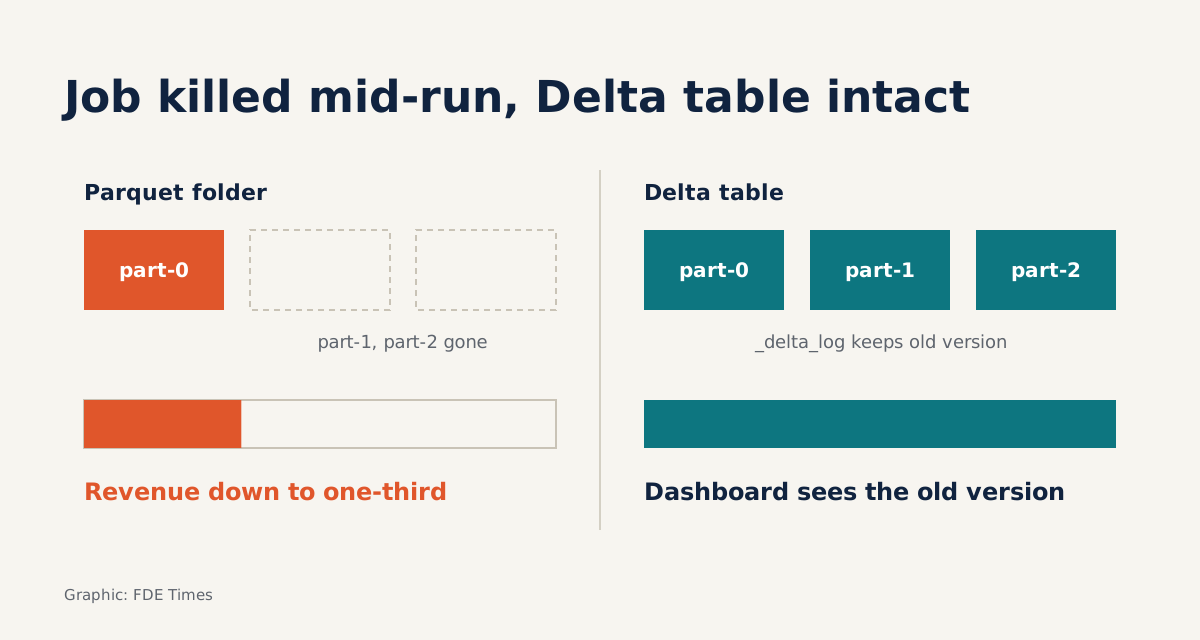
On Monday morning, the client’s revenue dashboard shows yesterday’s figure at a third of a normal day. Nobody has touched the code. The overnight job only overwrote the previous day’s partition on S3, and was killed halfway through after running out of memory.
The scenario is hypothetical, but anyone who has worked on data at a client site long enough has met some version of it. The fault is not with S3. The fault is in treating a folder of files as if it were a table.
At every kickoff, someone says “just dump everything into S3”. A forward deployed engineer needs to know when a folder of files is enough, when a table format is required, and how to lock down a bucket so client data is neither exposed nor lost. Engineers who understand this build pipelines clients can rely on; those who do not build pipelines that work in the demo.
What object storage promises, and what it does not
AWS describes S3 as an object storage service, commonly used for data lakes, backup, archiving and big data analytics. S3 provides strong read-after-write consistency for PUT and DELETE in every Region. Google Cloud Storage makes a similar guarantee for all uploads.
The word “object” deserves a careful reading. The S3 documentation is explicit: all updates are key-based, and there is no way to update multiple keys atomically. If two PUTs write to the same key, the request with the later timestamp wins. S3 does not lock objects for you, so any locking mechanism has to be built by the application.
Azure Blob Storage adds Data Lake Storage with a hierarchical file system, so do not assume S3’s limits apply unchanged to every cloud. The example below sticks to S3, where the limits are most clearly documented.
Tracing an overwrite job that dies halfway
Picture the folder s3://acme-lake/orders/order_date=2026-10-08/ holding three files: part-0, part-1 and part-2. The overwrite job takes the naive approach: delete the three old files, then write three new ones. Each operation is a separate request against a separate key.
Suppose the job dies just after writing the new part-0. A reader lists the folder, finds a single file, and reports revenue at a third of the real figure.
Reverse the order, writing the new files first and deleting the old ones afterwards, and a failure midway leaves the reader seeing both old and new files. Revenue is counted twice.
Neither order is safe, because no transaction spans multiple keys.
Delta Lake solves this with a file-based transaction log stored alongside the Parquet files, giving ACID transactions.
# Overwrite exactly one day, atomically at the table level
(df_new.write.format("delta")
    .mode("overwrite")
    .option("replaceWhere", "order_date = '2026-10-08'")
    .save("s3://acme-lake/orders"))

# Read back the version from before the job ran, for comparison
before = (spark.read.format("delta")
    .option("versionAsOf", 41)
    .load("s3://acme-lake/orders"))
The first statement overwrites exactly one day, atomically at the table level; the second reads back the version from before the job ran, for comparison. If the job dies before the commit step, the new files simply sit there with no table pointing to them. The dashboard still sees the complete old version. Every write to a Delta table creates a new version, so when the client asks what the table looked like yesterday, you can answer without digging through backups.
Delta, Iceberg or Hudi: choose by the client’s engine
All three formats solve the same problem, but each is strong in a different place. The first question to ask is not “which format is best” but “what engine does the client use to read the data”.
| Format | Strength | Use it when |
|---|---|---|
| Delta Lake | Open transaction log on top of Parquet; every write creates a version | The client already runs Databricks |
| Apache Iceberg | Built for very large analytic tables; time travel lets you rerun queries against an exact snapshot | The client is on AWS and wants S3 Tables, querying through Athena, Redshift or Spark |
| Apache Hudi | Two table types, COPY_ON_WRITE and MERGE_ON_READ; strong at upserts and deletes | The source continually updates or deletes individual rows |
For Iceberg, AWS now offers a dedicated type of table bucket, S3 Tables, purpose-built to store tables in this format. If the client lives in the AWS ecosystem, that is the path of least friction.
Iceberg’s time travel also meets a very common requirement: an auditor wants to rerun last week’s report and get exactly the same numbers.
The client’s bucket: lock it down first, optimise later
S3 buckets and the objects in them are private by default. Keep them that way and always enable Block Public Access. If another team needs the data, grant access by identity rather than opening the bucket for convenience.
Next come three protective tools. Versioning keeps previous versions of each object. Object Lock (WORM) prevents objects from being deleted or overwritten for a fixed period or indefinitely. Lifecycle automatically transitions or deletes old data to save costs.
It is important to distinguish two layers of protection. S3 Versioning rescues individual files. A table format’s time travel rescues the state of the whole table. When taking in raw data that carries compliance requirements, consider Object Lock for the raw zone.
Lifecycle rules must be designed together with the table format’s version clean-up policy. Otherwise you may accidentally delete the very files an old version still needs.
Five steps when taking on a new data lake
The first step is to map who writes, who reads, and how many jobs write to the same place. That map alone tells you whether there is a last-writer-wins risk. The second step is to separate two zones: a raw zone that only appends raw files, and a table zone that uses a table format.
The third step is to choose a format based on the client’s engine, as in the table above. The fourth is to configure the bucket: private, Block Public Access, Versioning, and then Object Lock and Lifecycle when there is a concrete reason. The final step is the one most often skipped: deliberately kill a job mid-write, then check whether the dashboard is still correct.
Mistakes that cost client trust
The most common mistake is treating a folder of Parquet files as a table, then letting two jobs overwrite it at the same time.
Another is opening a public bucket “just for one afternoon” to share files with a partner.
A subtler mistake is choosing a format because it is fashionable rather than because it fits the tools the client pays for and operates every day. However elegant a Hudi table is, it is worthless if the client’s analytics team only knows Athena and nobody can maintain it.
When reading FDE job descriptions, look for terms such as “lakehouse”, “Iceberg”, “Delta” or “CDC”. On your CV, do not just write “used S3”. Say specifically which tables you designed, which format you chose, and how you rehearsed failure scenarios.
Sooner or later, the client’s overnight job will die halfway through. What needs deciding today is whether the next morning’s dashboard shows the figures from the day before yesterday, or a third of the truth.
Was this article useful?
Thanks for the feedback!